
Creating a productive home office environment is essential for anyone working remotely or managing tasks from home. A well-organized, comfortable, and inspiring workspace can significantly improve focus and efficiency. Whether you have a dedicated room or a small corner in your living space, these tips will help you turn it into a productive home office.
Choose the Right Location
Select a Quiet Space
Find an area in your home with minimal distractions and noise. This helps you concentrate better and maintain a professional mindset.
Consider Natural Light
Natural sunlight boosts mood and energy levels. Position your desk near a window if possible, but avoid glare on your computer screen.
Evaluate Space and Comfort
Ensure the space is large enough to accommodate your equipment and allows comfortable movement. A cramped workspace can feel stressful and limit productivity.
Invest in Ergonomic Furniture
Comfortable Chair
A good ergonomic chair supports your back and promotes healthy posture. Look for adjustable height and lumbar support to reduce strain during long work hours.
Adjustable Desk Options
If possible, use a desk with adjustable height or consider a sit-stand desk. Changing your position throughout the day can help reduce fatigue.
Monitor and Keyboard Placement
Keep your monitor at eye level to prevent neck strain. Position your keyboard and mouse so your wrists remain straight and relaxed.
Organize Your Workspace
Declutter Your Desk
Keep only essential items on your desk to reduce distractions. Use drawers or shelves to store paperwork and supplies neatly.
Use Storage Solutions
Invest in organizers, filing cabinets, or storage boxes to keep things tidy. Label items for easy access and maintain a clean look.
Cable Management
Use cable ties or clips to keep wires organized and prevent tangling, improving both safety and aesthetics.
Enhance Lighting and Ambiance
Combine Natural and Artificial Lighting
Use a mix of overhead lights and task lamps to illuminate your workspace evenly. Avoid harsh or flickering lights that can cause eye strain.
Add Personal Touches
Decorate with plants, artwork, or meaningful items to make the space inviting and boost your mood. Just keep it minimal to avoid clutter.
Control Noise Levels
If ambient noise is an issue, try noise-canceling headphones or a white noise machine to maintain focus.
Establish Productivity Habits
Set Regular Work Hours
Designate consistent start and end times to create a routine that separates work from personal life.
Take Scheduled Breaks
Step away from your desk regularly to stretch, move, or rest your eyes. Short breaks can improve overall productivity.
Limit Distractions
Turn off unnecessary notifications on phones and computers. Communicate boundaries to family or housemates during work hours.
Utilize Technology Wisely
Reliable Internet
Ensure your internet connection is stable to prevent interruptions during meetings or deadlines.
Productivity Tools
Use apps for task management, note-taking, and time tracking to stay organized and motivated.
Backup and Security
Regularly back up important files and use secure passwords to protect your work environment.
Maintain Work-Life Balance
Separate Work and Relaxation Zones
If space allows, keep your office separate from leisure areas to mentally disconnect after work.
Create a Shutdown Routine
At the end of the day, tidy your workspace and power down devices to help transition into personal time.
Prioritize Health
Incorporate stretches, hydration, and ergonomic practices to support your well-being while working from home.
Final Thoughts
A productive home office is more than just a desk and a chair—it’s about creating an environment that supports your work style and well-being. By thoughtfully setting up your space and adopting positive habits, you can boost your focus, creativity, and overall job satisfaction. Start with small changes and adjust as needed until your home office feels just right for you.
Related Posts
Tips for Creating a Cozy and Productive Home Office Space
Creating a home office that feels both cozy and productive…
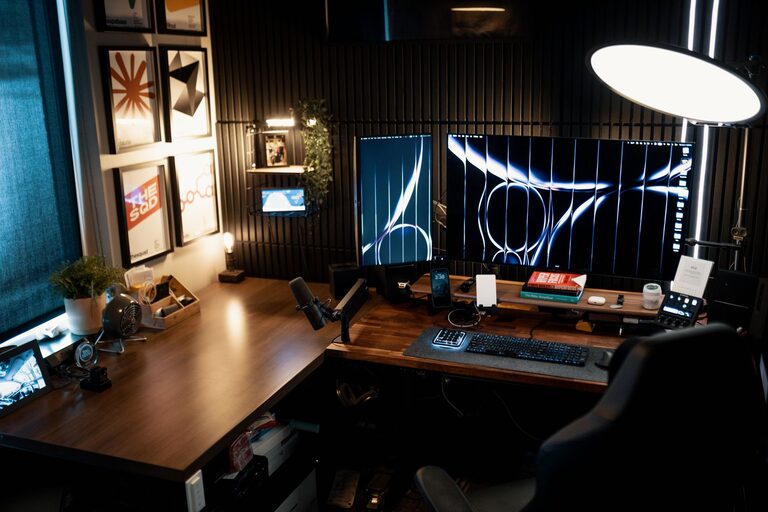
Tips for Creating a Cozy and Productive Home Office Space
Creating a home office that feels both cozy and productive…
Tips for Creating a Cozy and Inviting Reading Nook at Home
Creating a cozy and inviting reading nook in your home…